Hey everyone, if you’ve ever spent time around industrial automation, smart traffic systems, or even the little boxes that keep your neighborhood security cams running, you know how crucial a signal junction box is. As someone who’s been selling these boxes for years, I can’t tell you how many times I’ve gotten calls from installers, electricians, and even small business owners panicking because they messed up connecting the power supply. One wrong move here can fry sensors, crash whole systems, or leave a site down for days—and trust me, no one wants that. Today, I’m breaking down exactly how to connect power supplies to a signal junction box, straight from the trenches. This isn’t some textbook essay; it’s the real stuff I walk my customers through every single week. Signal Junction Box
First, let’s get one thing straight: a signal junction box’s power setup isn’t one-size-fits-all. I’ve seen folks try to use a random power supply from an old computer and blow up a $500 sensor, so matching your power supply to your box’s specs is non-negotiable. Let’s start with the basics you need to have on hand before you even touch a wire. No, you can’t grab this stuff last minute at a gas station—trust me, I’ve seen that mistake too.
First, check your box’s rating. Every signal junction box we sell (and I’d bet most reputable brands) has a tiny sticker on the inside of the lid that tells you the input voltage, amperage, and type (AC or DC). Most of the time, it’s 12V DC, 24V DC, or 120V AC, but if you’re working with a specialized box for industrial stuff, it could be 230V AC. Don’t guess here—measure it with a multimeter if the sticker is faded. Next, your power supply has to match that. A 12V DC box needs a 12V DC power supply, 24V DC needs 24V, and so on. And amperage? Never use a lower amperage power supply than the box requires. If your box needs 2A, get a 2A or higher supply—over is safe, under is a fire hazard or a dead box.
Then, your tools. You’ll need a good multimeter (the analog ones work, but digital is way easier for reading small voltages), wire strippers, a flathead or Phillips screwdriver (we include the right size for our boxes, so you don’t have to hunt), wire nuts or crimp connectors (don’t use electrical tape alone—tape fails), and if you’re working outdoors, a waterproof sealant or rubber grommet for the cable entry. Oh, and safety gear: rubber gloves and safety glasses. I’ve had a stray wire snap and nick my eye once, so I never skip that.
Now, the part everyone skips but which is super important: prepping the site. If your box is going outdoors—like on a traffic pole or a building exterior—you need to make sure the cable entry point is sealed. Moisture is the #1 killer of signal junction boxes, and a bad seal will ruin a connection in months. For indoor boxes, dust and debris are more of a problem, so clear the entry area before you push any cables through. Also, turn off the main power at the breaker before you do anything. I know it sounds obvious, but I’ve had a customer call me at 8pm once because he thought “it’s just 12V” and got a shock that landed him in urgent care. Never skip turning off the power.
Okay, let’s get to the actual wiring step. First, route your power cable through the correct entry port on the box. Most boxes have multiple ports—labeled “power in”, “signal out”, etc.—so don’t force a signal cable into the power port. Pull about 6 inches of extra cable inside the box, that way you have room to work without straining the connection. Now, strip about ½ inch of insulation from the ends of the power cable, on both the line (hot), neutral, and ground wires. Wait—yes, ground wire. Even if your box says it’s double-insulated, ground is non-negotiable for outdoor or industrial use. It’s there to protect you and the equipment if there’s a power surge.
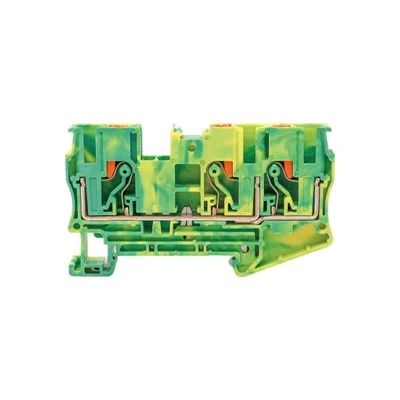
Now, look at the terminal block inside the box. Terminal blocks are the little screw-down connectors that all wires attach to. They’re usually labeled: L for line (hot), N for neutral, G or E for ground. Take your time here—we mark the terminals clearly on every box we ship, so if you’re confused, just flip open the lid and look. Don’t mix up L and N. That’s another common mistake: swapping line and neutral will make the box work, but it’s a safety risk and can damage the power supply over time.
So, tighten each wire into its terminal. Push the wire in until it’s firm, then turn the screw clockwise until it’s snug—don’t over-tighten, because that can strip the terminal and make a loose connection. A loose connection will cause voltage drops, which make your sensors act weird or your signal cut out. I’ve had a customer blame his box for “glitching” when it was just a loose power wire—took him 2 hours to find that, so save yourself the trouble.
Once all wires are tightened, double-check everything. Run your fingers along each wire to make sure none are sticking out of the terminal, and use your multimeter to test the voltage at the terminal block. Turn the power on at the breaker, set your multimeter to the AC or DC voltage setting (match your power type!), touch the probes to L and N—you should get a reading within 5% of your power supply’s rated voltage. If you get 0 or a weird number, turn the power off and check your wiring. Most of the time, it’s a loose wire or swapped terminals.
Now, seal up the box. Close the lid and tighten the screws—don’t over-tighten, or you’ll crack the plastic. If you’re using the box outdoors, use a silicone sealant around the cable entry to keep water out. We always include a tube of sealant with our outdoor-rated boxes, so don’t waste it. And one last thing: label the box. Write “Power: 12V DC, 2A” on the lid with a permanent marker. If someone has to work on it later, they won’t have to guess what power supply it needs.
Wait, I want to add a few common mistakes I see all the time, because these are the things that make installers call me at 2am. First, using a power supply that’s too high amperage. No, that won’t fry your box. The box only draws what it needs, so a 5A power supply for a 2A box is totally fine. The reverse? If you use a 1A supply for a 2A box, the supply will overheat and die, taking your box with it. Second, daisy-chaining too many boxes off one power supply. I’ve seen someone hook 8 12V boxes to a 5A supply—total disaster. Each box has a power draw, add them up, and get a power supply that can handle at least 20% more than that total. So if your total draw is 4A, get a 5A supply. Third, skipping the ground wire. It’s not a scam—lightning strikes, power surges from the grid, even static electricity can ruin a box without a ground. I’ve had customers swear they don’t need it, then call me a month later to replace 3 boxes that got fried in a storm. Don’t be that customer.
Another thing: if you’re using a signal junction box for a specific application, like a smart irrigation system or a security camera array, double-check the manual for that app. We have separate guides for boxes used in traffic vs. retail lighting, because sometimes you need extra surge protection for industrial sites. If you’re not sure, just shoot me a message—our tech support team is on call 7 days a week for our customers, so don’t guess.
I’ve been in this business for 12 years, and I’ve seen every possible power connection fail. The ones that work are the ones where someone takes their time, checks the specs, and follows the basic steps. It’s not rocket science, but it’s attention to detail that makes the difference between a system that runs for 5 years and one that dies after 6 months.
At the end of the day, signal junction boxes are the unsung heroes of modern infrastructure. They keep cameras working, traffic lights on, factories running. So getting the power connection right isn’t just about avoiding mistakes—it’s about making sure the systems that people rely on every day work when they need to.
If you’re working on a project and need the right signal junction box for your power setup, or you have questions about wiring specifics, reach out to our team. We don’t just sell boxes—we help installers, electricians, and business owners get the job done right, no hoops to jump through. Just connect with our sales team to chat through your needs, and we’ll make sure you get everything you need.
Pull Spring Terminal References
Industrial Automation Technical Guide, 2022
National Electrical Code (NEC) Article 312, 2023
Signal Junction Box Design and Application Manual, 2021
Low-Voltage Wiring Best Practices for Outdoor Sites, 2020
Zhejiang Weide Electric Co., Ltd.
Zhejiang Weide Electric Co., Ltd. is one of the most professional signal junction box manufacturers and suppliers in China, featured by quality products and low price. If you’re going to buy the newest signal junction box, welcome to get free sample from our factory. We also accept customized orders.
Address: No.555, South Binhe 2nd Road, Yueqing City, Zhejiang Province, China
E-mail: zjwdir@wdirele.com
WebSite: https://www.chweide.com/
